
Running an online store involves a long list of daily tasks like compliance, marketing, fulfillment, and more, and order documentation sits close to the top of that list. Every purchase needs a clear invoice, and every shipment needs a packing slip that guides the fulfilment team. These documents act as anchors for order accuracy, customer communication, and financial records. Yet many store owners still handle these processes manually. This adds unnecessary work and increases the chance of mistakes.
Besides, creating invoices and order documents one by one slows the order flow and interrupts an otherwise streamlined purchase journey. Store owners may need to switch between screens, copy details, and prepare each order document. This takes time, and even a small error can affect the entire fulfillment process. As order volumes increase, the pressure intensifies, and the team struggles to keep up.
Automation solves these and many other challenges with a dependable process that works in the background. Automated PDF invoices and packing slips reduce time spent on administrative tasks and support a smoother fulfilment workflow. This much-needed shift strengthens efficiency and creates a more reliable experience for your customers.
How Automated PDF Invoices Strengthen WooCommerce Store Operations?
Automated PDF invoices do more than replace manual paperwork. They help your WooCommerce store run with greater clarity and consistency. Once automation takes over repetitive invoice tasks, your team gains more time to focus on fulfillment and customer service.
The first improvement appears in order processing speed. Automated invoices are generated as soon as an order reaches specific statuses, which removes the need for manual check-in. This keeps the workflow steady and prevents the bottlenecks that appear during busy sales periods.
Accuracy improves as well. Manual preparation invites oversight, but automated invoices pull data directly from the order. Product details, customer information, tax values, and totals stay consistent throughout the process, thus reducing the number of corrections your support team must handle later.
Another important benefit is compliance. Many regions expect clear tax information and proper record-keeping. Automated invoices provide structured documentation for every order, so your financial records stay complete and easy to verify. This also simplifies audits or reporting requirements.
A professional PDF invoice also shapes the customer experience. Shoppers appreciate a clear summary of their purchase. It sets the tone for the rest of the order journey and builds confidence in your store. By sending accurate invoices with consistent formatting, you strengthen trust and present your brand with clarity.
Automation pulls all these advantages into one smooth process. It supports daily operations, reduces errors, improves compliance, and delivers a polished experience for customers.
How Automated Packing Slips Improve Order Fulfillment?
Packing slips guide the fulfilment process, so any delay at this stage affects the entire delivery chain. Automated packing slips give your team accurate information the moment an order enters the fulfilment stage, which keeps operations steady and reduces confusion.
The first benefit appears in warehouse efficiency. Automated packing slips reach the in-house or third-party fulfillment team without delay, so the picking process begins sooner. They receive clear item details for every order, which cuts down the time spent checking and confirming products.
Faster picking leads to faster shipping. When your team has accurate information in front of them, they work with a steady rhythm. This helps maintain predictable dispatch times, even during busy seasons.
Automation also reduces fulfillment mistakes. A missing or incorrect item usually starts with unclear or incomplete documentation. Automated packing slips remove that risk by pulling accurate details directly from each order.
With automated packing slips, your WooCommerce store delivers a more dependable fulfillment flow. The team works faster, mistakes are reduced, and customer satisfaction improves as the right orders reach them on time.
Why Automate PDF Invoices and Packing Slips?
Many WooCommerce stores begin with simple workflows, but these methods fall short as order volumes grow. Manual document creation and basic third-party tools add friction to daily operations and make it difficult to manage orders with confidence.
- Time management: Preparing invoices or packing slips for each order takes far longer than most store owners expect. Repeating the same steps for every order slows fulfillment and adds pressure during busy periods.
- Higher risk of human error: A small slip in data entry can lead to incorrect totals, missing product details, or inconsistent records. These mistakes create extra support work and can disrupt the customer experience.
- Disconnected workflows: When invoicing tools, fulfillment tools, and WooCommerce store data do not work together, the team must switch between systems to complete routine tasks, which breaks the flow and increases the chance of oversight.
- Scaling: As orders increase, manual tasks become unmanageable, and basic tools cannot support the load. Delays multiply, and customer satisfaction drops.
Automating invoice and packing slip process can help remove these barriers with dependable workflows that support growth and maintain accuracy across every order.
Also read: Top Plugins for Software Companies: Secure, Optimize, and Scale Your Website
Automate PDF Invoices and Packing Slips with WebToffee
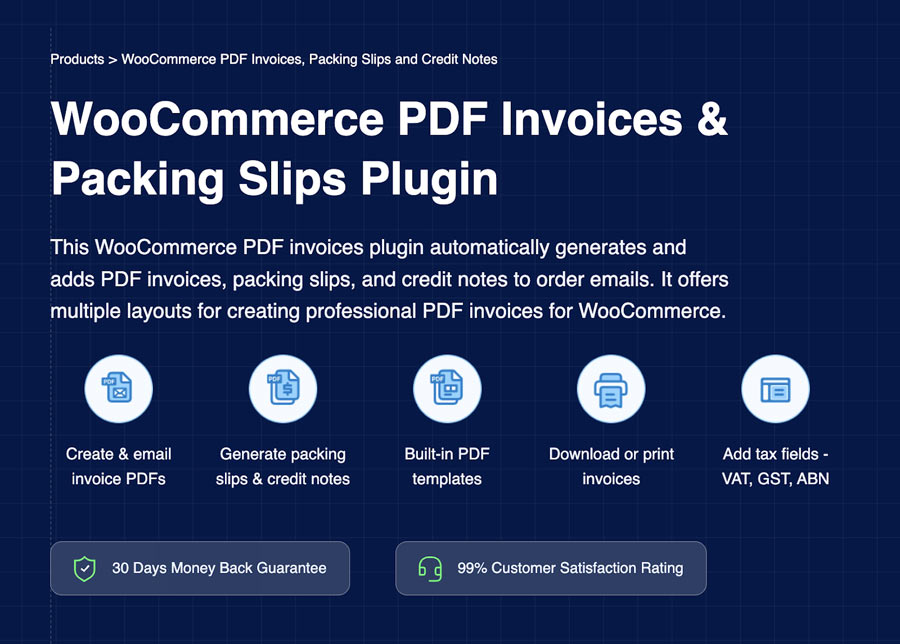
Accurate order documentation keeps your store organized, and the WebToffee PDF Invoices and Packing Slips plugin brings that consistency into your workflow. The plugin prepares all essential documents automatically, so your team spends less time on paperwork and more time on fulfilment and customer support.
The plugin creates PDF invoices, packing slips, and credit notes and attaches them to the appropriate order emails. Every document follows the structure you choose, and you can adjust templates to match your store’s style. This includes branding elements, tax details, and layout adjustments that give your documents a polished and consistent appearance. The plugin also supports UBL and XML invoices, which help stores follow global e-invoicing requirements.
Beyond invoices, the plugin prepares clear packing slips, making it easier to pack and dispatch orders with accuracy. Every step feels more organized, and both customers and store owners receive clear records for each transaction.
Some of the key features of the plugin are:
- Generates invoice PDFs, packing slips, delivery notes, credit notes, and shipping labels
- Automatically attaches PDF invoices and order documents to order emails
- Set up custom WooCommerce invoice numbers
- Supports UBL/XML invoice generation
- Provides RTL-language support
- Customizable invoice templates with branding support
- Option to bulk print invoices from the order listing page
- Visual and code invoice editors are available
The free PDF invoices and Packing Slips version offers essential tools for stores that need reliable order documentation. You can upgrade to the premium version of the PDF invoices plugin if you need advanced features that support higher order volumes and deeper customisation.
How to Create and Automate WooCommerce PDF Invoices and Packing Slips? (Free Version)
Step 1: Install and Activate WebToffee PDF Invoices Plugin
- From your WordPress dashboard, go to Plugins and select Add plugin.
- Search for WooCommerce PDF Invoices by WebToffee.
- Install and activate the plugin to begin the setup.
After installation, enter your business details, including your name, logo, tax information, and address.
Step 2: Configure PDF Invoice Settings
- Go to Invoice/Packing > General Settings > Invoice
- Click the Enable Invoice option.
- Choose the date for invoice activation.
- Select the order statuses that should trigger automatic invoice creation.
- Pick the email that will carry the attached PDF invoice.
- Choose a format for your invoice numbers. Add prefixes or suffixes if needed. You can also define the length of the invoice number.
- Save your changes once complete.
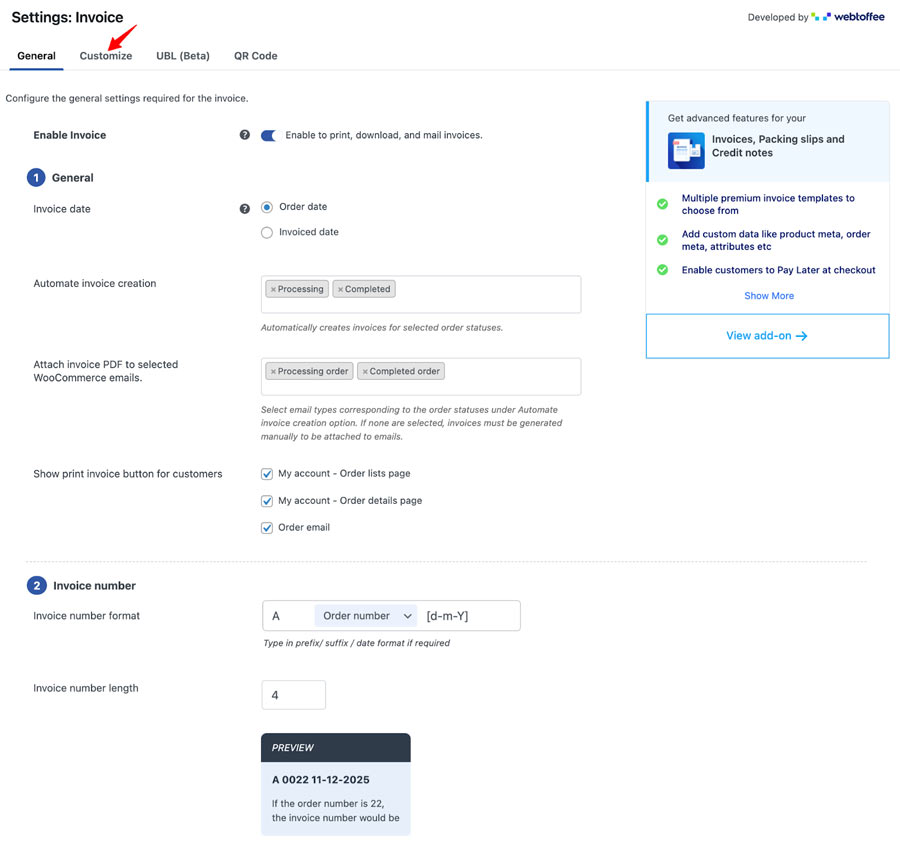
Your WooCommerce PDF invoice setup is now complete. You may customize the PDF invoice templates by switching to the Customize tab. You can edit fields, change colours, update fonts, and modify the structure to match your store’s branding.
Step 3: Automate WooCommerce Packing Slips
- Go to Invoice/Packing and select Packing slip.
- Choose whether to include product images, customer notes, or a footer.
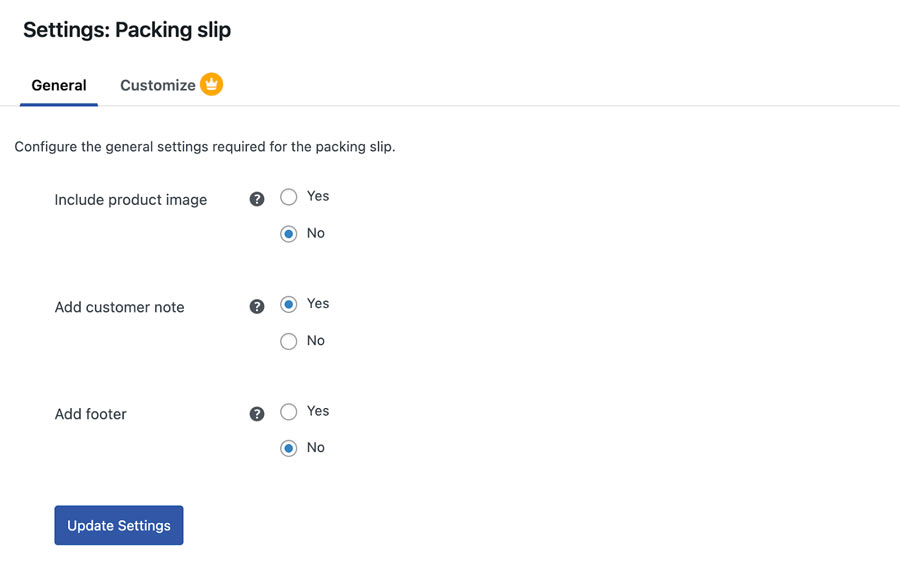
- Select Update Settings to save your choices.
Wrapping Up
Automated PDF invoices and packing slips save valuable time, reduce errors, and support a smoother fulfilment process. Customers receive clear and professional documents, and your team works with better accuracy at every stage of an order.
As your store grows, automation becomes an essential part of the workflow. It keeps operations organized and removes repeated tasks. The WebToffee plugin offers a practical and dependable way to bring automation into your store and build a stronger order fulfillment foundation for future growth.
Thanks for reading!